




AI Summary
- The game development landscape is evolving rapidly, with developers seeking games that offer a strong concept, engaging gameplay, and monetization potential.
- Luck Be a Landlord stands out for its unique blend of a slot machine mechanic and strategic depth, providing successful progression and replay value without requiring high-end graphics.
- Indie developers can benefit from creating a Lucky Be a Landlord clone in just two weeks, focusing on essential tools like Unity or Godot for game development, simple 2D art assets, and engaging sound design.
- The blog outlines a detailed two-week sprint plan, covering foundational elements, symbol mechanics, gameplay progression, and launch preparation.
- By combining slot game mechanics with strategic decision-making, Luck Be a Landlord offers a compelling gameplay experience that challenges players to think strategically about symbol synergies and rarity levels.
The game development ecosystem is changing rapidly. Developers look for games that will give them a good concept with a low number of development hours, exciting gameplay (and replayability), and possible monetization. Luck Be a Landlord is one such game that has recently gained attention for its successful slot machine mechanic combined with strategic game depth. Luck Be a Landlord is both a slot game and a strategy game—and it has successful progression, replayability, and monetization opportunities all while not needing hyper-realistic graphics and a significant tech stack.
For indie developers, trying to build a lucky be a landlord clone is ideal for those who need to clone something in a short period—if they are an indie developer, startup, or studio that need to actually build a functioning clone or something inspired by the game. In this blog, we will outline how to create a Lucky Be a Landlord clone in two calendar weeks, including technical requirements, sprint goals, gameplay loops, and launch plan.
What Makes Luck Be a Landlord So Engaging?
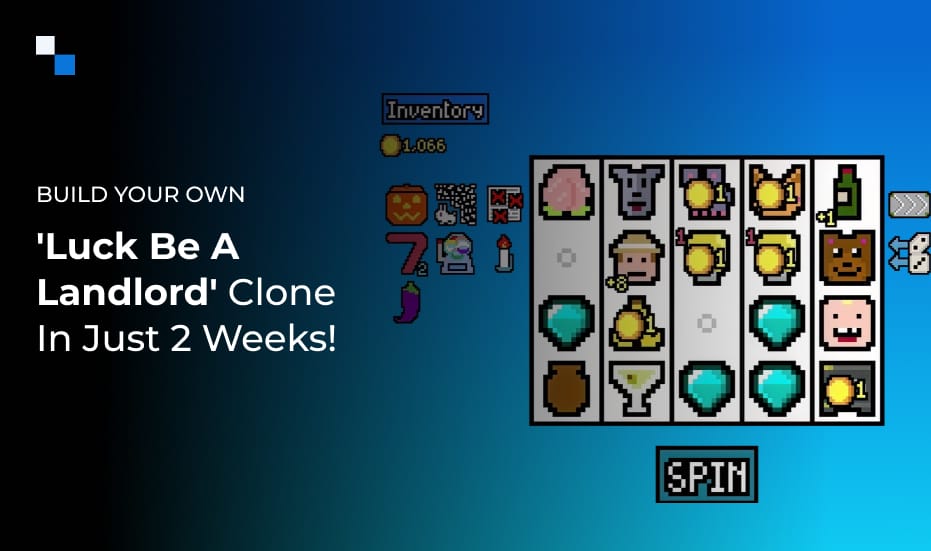
Before diving into the slot game development side of things it is essential to analyze the gameplay core of Luck Be a Landlord. Essentially, Luck be a Landlord is disguised as a slot machine, but at its core it is really a roguelike deck-builder. The player spins a slot machine to earn coins to pay rent; they add new symbols to the slot machine grid and the symbols synergize to earn greater pay offs over time. Every few spins the rent goes up and the player must adapt their strategy or be evicted from their unit.
Unlike other simulations of a slot machine, Luck Be a Landlord does something interesting with the simple spinning mechanics in the way it creates deep decision making. As a game developer this is a compelling mix of developing a slot game and a strategy game. The player has to think about each symbol’s ability, rarity, and synergy, the same way as they would if they were playing a card-based strategy game with a deck of cards.
Tools & Technologies You’ll Need
You don’t need a massive team or AAA engine to build this clone. Here’s what’s essential:
- Game Engine: Unity (C#) or Godot (GDScript) is ideal for 2D game development. If you prefer browser-first deployment, consider Phaser with TypeScript.
- Art & UI: Simple 2D sprites for symbols, buttons, and backgrounds. Asset marketplaces or open-source packs work well to start.
- Sound: Use free libraries for spins, wins, and UI clicks. Sound design enhances slot feedback immensely.
- Team: One developer, one designer, and optionally one UI/UX artist.
Two-Week Development Sprint Breakdown
Week 1 – Laying the Foundations
Day 1–2: Project Setup & Core UI Framework
- Initialize your project using a 2D template in Unity, Godot, or Phaser.
- Set up screen resolution, canvas scaling, and basic scene structure.
- Design a clean UI layout with essential elements:
- Slot grid (5×5)
- Spin button
- Coin counter
- Rent timer display
- Slot grid (5×5)
- Implement basic game states: start screen, active gameplay, game over.
- Create placeholder assets to simulate spins and interactions.
Day 3: Symbol Object System
- Build a modular symbol class or object script that includes:
- Name
- Base coin value
- Rarity level
- Tags (e.g., animal, food, rare)
- Synergy rules
- Name
- Add a database or JSON file to manage symbol data dynamically.
- Implement a basic symbol pool with 10–12 items (e.g., Coin, Cherry, Cat, Milk).
Day 4: Spin Mechanics & Result Calculation
- Create logic for the “Spin” button to trigger:
- Slot animations
- Random symbol generation from pool
- Coin tally based on current grid
- Slot animations
- Implement coin gain animations and UI updates.
- Ensure spins refresh the entire grid unless otherwise affected by synergies.
Day 5: Rent Cycle & Game Progression
- Implement the rent cycle system:
- Rent is due every X spins (e.g., every 5 spins)
- Rent amount increases after each cycle
- Rent is due every X spins (e.g., every 5 spins)
- Show countdown to next rent due
- Deduct rent from the player’s coin balance; if they can’t pay—trigger Game Over.
Day 6–7: Symbol Synergies & Basic Shop UI
- Add synergy logic:
- Example: Cat gets bonus if Milk is present
- Example: Banana gives more if Monkey is present
- Example: Cat gets bonus if Milk is present
- Display synergy effects through popups or coin multipliers.
- Design a simple shop mockup for symbol addition after each rent cycle:
- Present 3 random symbols (with rarity)
- Option to reroll using a token
- Option to skip or lock selection
- Present 3 random symbols (with rarity)
Week 2 – Polish, Gameplay Depth & Launch Readiness
Day 8: Symbol Inventory & Management
- Build an inventory system to track symbols currently in the player’s deck.
- Allow symbol removal with a cost or token.
- Display current deck during and after spins.
- Add max deck size to limit randomization chaos.
Day 9: Rarity System & Advanced Symbol Logic
- Add tiers of symbol rarity (Common, Uncommon, Rare, Very Rare).
- Adjust appearance odds based on rarity and game progression.
- Introduce “Item” mechanics (passive boosts like “Happy Hour” or “Rusty Gear”).
- Create synergy clusters to deepen gameplay complexity.
Day 10: Visual Feedback & Animations
- Polish slot animations: spinning, symbol bounce-in, coin popups.
- Add sound effects for spin, win, shop actions.
- Integrate subtle VFX like sparkle on rare symbols or synergy triggers.
Day 11–12: UX Polish, Game Balance & Menus
- Add Start Menu, Pause Menu, Game Over screen.
- Tweak rent curve to ensure gradual difficulty.
- Playtest to identify overpowered or useless symbols.
- Add tutorials or popups for new players.
Day 13: Testing, Bug Fixes & Performance Optimization
- Test symbol logic, rent conditions, shop items, and UI flow.
- Run test spins to confirm synergy effects work correctly.
- Optimize for performance—especially for WebGL or mobile targets.
Day 14: Export, Deployment & Next Steps
- Export builds for browser, desktop, or mobile platforms.
- Optional: Upload to itch.io or TestFlight for limited testing.
- Prepare for further feature updates like:
- Daily missions
- Endless mode
- Player customization
- Web3 reward integrations
- Daily missions
Why Antier Is Your Ideal Development Partner
Looking at global app store trends, slot game development is thriving—especially when combined with engaging mechanics like strategy and progression. With rapid prototyping, tokenized economies, hybrid mechanics, etc. the time is ripe to do something creative with these loops and modalities, including utilizing Web3 features or player owned assets in the way that these games work.
At Antier, we create games from inception to completion – hypercasual, P2E, blockchain-integrated, etc. No matter what your vision includes for building the next targeted strategy game, a Web3 casino and slot experience, or a mobile-first slot simulator, Antier can reduce your time to market with security, scalability, immersive play and graphic quality. So are you ready to spin the next great success of history? Let’s build together.